Podiatry clinical photos: organizing follow-up
Link images and videos to visits with clinical date, region, context and privacy controls. Includes actual PodoClinix patient-file limits.

Key takeaway
A follow-up photograph needs context: correct patient, region, side, care date and description. Keeping it with the record links it to assessment, but the image alone does not establish a diagnosis or improvement.
Explain the purpose before recording and check appropriate consent or other valid authority under local rules and practice procedures. Distinguish care from publication or promotional use: these are different purposes. The linked GMC guidance is a UK professional reference, not a replacement for requirements in your country.
Context accompanying a photograph
| Information | Record | Value |
|---|---|---|
| Clinical date | When the image or care occurred. | May differ from upload date. |
| Region | Foot, side and specific location. | Prevents comparing different regions. |
| Description | Purpose and connection to the note. | Makes the file understandable beyond its filename. |
| Conditions | Relevant changes in framing or light. | Prevents assuming a visual difference is a clinical change. |
The process at a glance
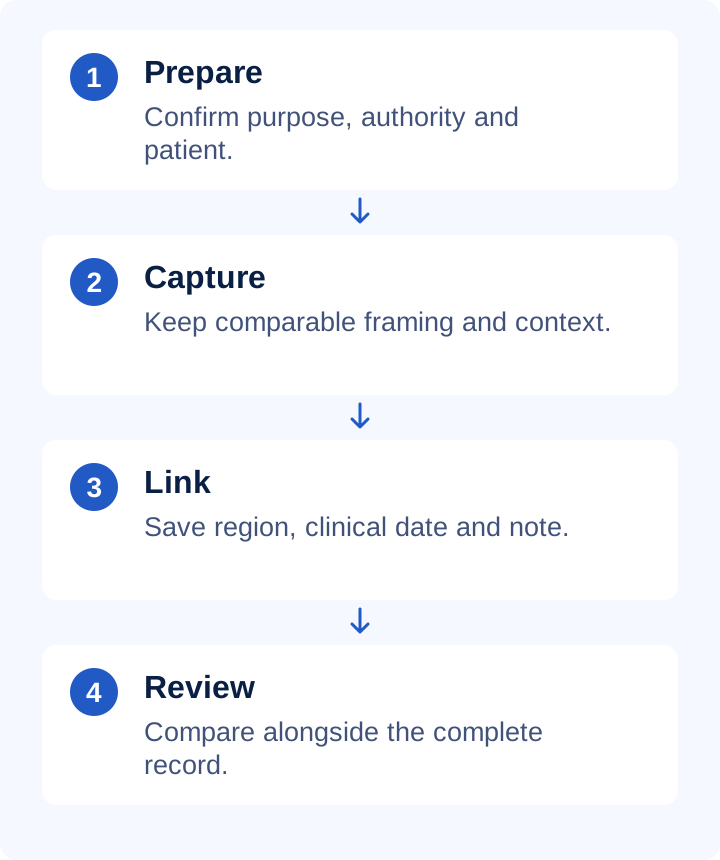
A contextualized attachment
Fictional case: a right-foot image from the second visit. Description: follow-up view of the same region as at the first visit, with slightly different framing. Link it to today's note and do not use it for promotion. Record changed lighting before comparison. The clinician interprets the image with examination and patient information.
Practical checklist
- Exclude identifiable bystanders, documents and screens.
- Do not apply cosmetic filters or alter clinical content.
- Keep the context and source of externally supplied images.
- Check who can open files and how access is removed.
- Follow the practice retention, correction and deletion policy.
What to check in PodoClinix
PodoClinix patient files accept JPG, PNG and WebP up to 10 MB per image, and MP4, WebM and MOV up to 30 MB per video. Select up to five files per batch, add clinical date and description, and open a saved file in a separate viewer. Patient files are private and are not published on the clinic page.
A detail worth reviewing
Compression to meet a file limit does not prove the result retains enough detail. Review it before saving. Permanently deleting a file differs from removing a reference in a note: read the confirmation and follow practice policy. Consent for care does not automatically authorize promotion or another secondary use.
Continue with these guides
- Podiatry progress notes: structure and example
Document a follow-up visit with reported changes, findings, assessment, actions and agreed review. Includes a fictional example and practical checks.
- Podiatry record backups: test recovery
Check backup scope, restoration and business continuity. Distinguish synchronization, export and backup with a practical fictional-record exercise.
- Podiatry and documentation glossary
Check definitions to use terminology consistently.
Sources and scope
- GMC · Visual and audio recordings
Primary reference for the principle identified in this guide. PodoClinix features are described separately from external references.
Examples and checklists are editorial proposals. Adapt the workflow to your practice and local requirements. References are provided for consultation, not as endorsements of PodoClinix.
Frequently asked questions
Not necessarily. Record the correct clinical date separately from when the file was added.
Run your podiatry clinic with PodoClinix
Clinical records, scheduling, WhatsApp reminders and 3D foot diagnosis. Start free, no card required.
Start free trial