Podiatry software walkthrough: a complete demo test
Evaluate one fictional patient through notes, foot charts, files, appointments and follow-up. A repeatable demonstration script without real patient data.

Key takeaway
A useful demo completes a whole case and retrieves what was saved. Use the same script for each provider: fictional patient, visit, note, attachment, appointment and follow-up. Record completed and outstanding tasks.
This walkthrough guide is not a vendor ranking or a recommendation based on unverified reviews. It provides a repeatable evaluation method. Distinguish functions you used yourself, functions demonstrated by a provider and functions merely mentioned during a call. Your minimum requirements should determine the test, rather than the order of a sales presentation.
Observable demonstration outcomes
| Test | Action | Check |
|---|---|---|
| Patient record | Create and search a fictional identity. | Find it without confusing another person. |
| Documentation | Add a note and foot point. | Retrieve date, description and laterality. |
| Files | Save and open a non-personal attachment. | Understand visit association and description. |
| Follow-up | Create a test appointment and second note. | Understand the sequence without sending an unauthorized real message. |
The process at a glance
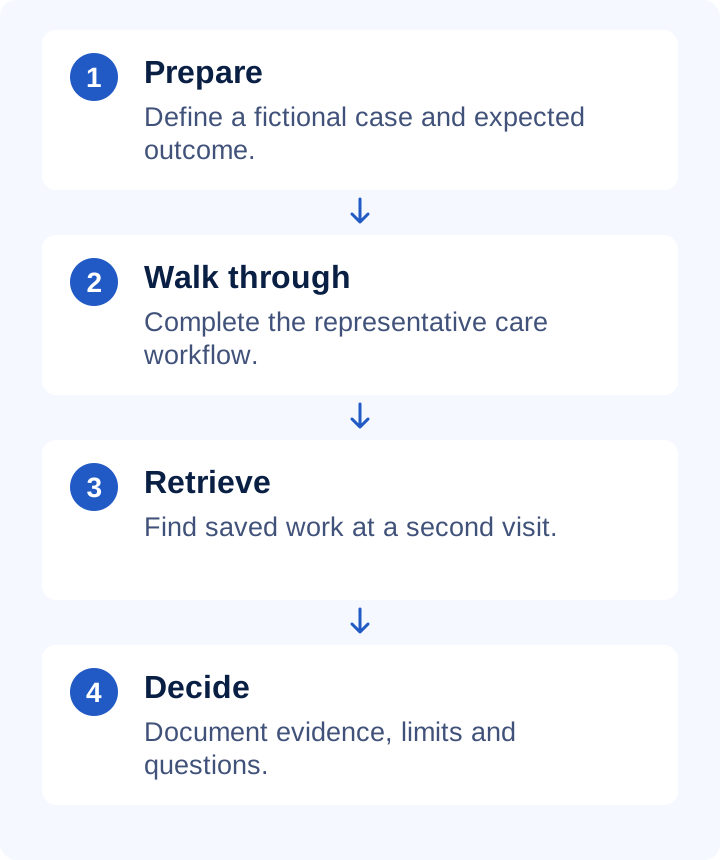
A simple evaluation worksheet
For each task, record 'completed by me', 'demonstrated by provider' or 'outstanding', alongside evidence and who will resolve questions. Fictional example: patient creation completed; second note retrieved; complete-history export awaiting confirmation. An outstanding requirement does not become approved because other parts of the demo were convincing.
Practical checklist
- Use fictional identities and prepared demonstration files.
- Do not send reminders to real patients during evaluation.
- Repeat the same case when comparing providers.
- Ask about limits, data access, support and total costs.
- Obtain written confirmation of essential integrations and functionality.
What to check in PodoClinix
PodoClinix's home includes an interactive 3D model and short demonstrations of foot charts, appointments and conversation. Screens show actual components with fictional data. Use them to understand the approach, then test your own workflow. These videos do not establish tax integrations, bulk import or other unconfirmed capabilities.
A detail worth reviewing
A screen tour can omit the end of a process. Ask to retrieve the note, open the attachment and explain corrections. If configuration is required, agree who will do it and how completion will be checked before real clinical use. Keep unresolved requirements visible in your decision record.
Continue with these guides
- Podiatry software on tablet, phone and desktop
Test notes, foot markers, attachments and appointments across devices. Practical acceptance checks with actual PodoClinix interface captures.
- Moving podiatry patient records from Excel
Plan field mapping, identifiers, attachments and reconciliation before migrating from spreadsheets. Includes a fictional pilot and validation checklist.
- Podiatry and documentation glossary
Check definitions to use terminology consistently.
Sources and scope
- HCPC · Record keeping
Primary reference for the principle identified in this guide. PodoClinix features are described separately from external references.
Examples and checklists are editorial proposals. Adapt the workflow to your practice and local requirements. References are provided for consultation, not as endorsements of PodoClinix.
Frequently asked questions
Start with essential practice tasks. Verifiable results from a complete workflow are more useful than a long untested feature list.
Run your podiatry clinic with PodoClinix
Clinical records, scheduling, WhatsApp reminders and 3D foot diagnosis. Start free, no card required.
Start free trial